- 0
- 3,993 words
Choosing the best cell phone for seniors is not simply about finding the newest or most expensive device. A good senior-friendly phone should make everyday communication easier. The screen should be clear, the sound should be loud, the controls should be understandable, and the battery should last long enough for normal daily use.
Some older adults only need a phone for calling family members. Others want video calls, text messaging, maps, email, photos, banking apps, and medical portals. A person with arthritis may need large physical buttons, while someone with limited vision may benefit from a bright touchscreen with adjustable text. A senior experiencing memory loss may need a phone that displays family members as large photo contacts.
For these reasons, there is no single device that is the best cell phone for seniors in every situation. The right choice depends on the user’s eyesight, hearing, hand movement, memory, technical experience, travel habits, and monthly budget.
This guide compares easy smartphones, basic flip phones, large-button models, and caregiver-managed devices. It also explains how to compare senior cell phone plans no contract, so buyers do not pay for data or services they will never use.
The recommendations include specialized senior phones as well as regular Apple and Samsung smartphones that can be simplified. Every buyer should test the phone where possible, check local network coverage, and confirm that the device works with any hearing aids or accessibility equipment they use.
What Makes a Cell Phone Easy for Seniors to Use?
The best cell phone for seniors should reduce unnecessary steps. A senior should not have to open several menus just to make a call, read a message, or find an important contact. The phone’s essential functions should remain visible and easy to reach.
Start by looking at the screen. Large text is helpful, but screen quality also matters. A bright display with strong contrast may be easier to read indoors and outdoors. Important information such as the battery level, time, caller name, and missed-call notification should be clearly visible.
Sound is another major factor. Look for adjustable call volume, a strong speaker, clear ringtones, vibration alerts, and hearing-aid support. Apple provides accessibility tools such as Made for iPhone hearing-device support, Live Listen, visual alerts, real-time text calls, and audio adjustments. Android also offers adjustable display size, font size, magnification, captions, hearing-aid support, and screen-reading tools.
Physical design is equally important. A large button cell phone for seniors may be better for someone who has arthritis, hand tremors, numbness, or difficulty using a touchscreen. Useful design features include:
- Large, separated number keys
- A textured or comfortable grip
- A simple charging cradle
- A dedicated emergency button
- Speed-dial keys
- A clear “Back” button
- A loud speakerphone
- A strong case that can handle minor drops
Battery life should also be considered. A phone with excellent features is not helpful when it is frequently uncharged. Charging cradles and wireless charging pads can be easier than inserting a small cable.
Finally, the best cell phone for seniors should work on a modern 4G or 5G network. Old 3G-only devices should be avoided because major 3G networks have been shut down, making many older phones and connected alert devices unusable.
Best Cell Phones for Seniors at a Glance
The following choices cover different levels of technical ability. Device prices, discounts, service requirements, and availability can change.
| Phone | Best for | Phone type | Main advantage | Possible limitation |
|---|---|---|---|---|
| Jitterbug Smart5 | Best overall easy smartphone | Smartphone | Large display and simple list menu | Requires Lively service |
| Jitterbug Flip3 | Large buttons and safety support | Flip phone | Tactile keys and optional Urgent Response | Limited apps |
| Consumer Cellular IRIS Easy Flip 2 | Basic calls and texts | Flip phone | Simple design and modern voice service | Not ideal for advanced apps |
| Apple iPhone 17e | Seniors familiar with Apple | Smartphone | Strong accessibility and long software support | Higher purchase price |
| Samsung Galaxy A27 5G | Affordable Android users | Smartphone | Large screen and Easy Mode | Requires initial customization |
| RAZ Memory Cell Phone | Memory or cognitive challenges | Simplified smartphone | Photo contacts and caregiver controls | Fewer general smartphone features |
The Jitterbug Smart5 is a strong choice for a senior who wants smartphone functions without a complicated home screen. It uses a large display, large text, a list-based menu, powerful speakers, voice typing, video chat, GPS navigation, and an optional Urgent Response service. Lively lists a 6.75-inch display, 128GB of storage, 5G service, and up to two days of typical battery use.
The Jitterbug Flip3 and IRIS Easy Flip 2 are better choices for people who mainly call and text. The Flip3 offers tactile buttons, high-contrast text, speed dial, a loud speaker, and optional access to emergency support. The IRIS Easy Flip 2 focuses on straightforward calling and texting and uses modern 5G voice technology.
The iPhone 17e and Samsung Galaxy A27 5G are regular smartphones. They are more flexible than specialized senior phones, but a family member may need to simplify the settings. The iPhone provides extensive vision, hearing, mobility, speech, and cognitive accessibility options. Samsung’s Easy Mode can create larger icons and a simpler layout.
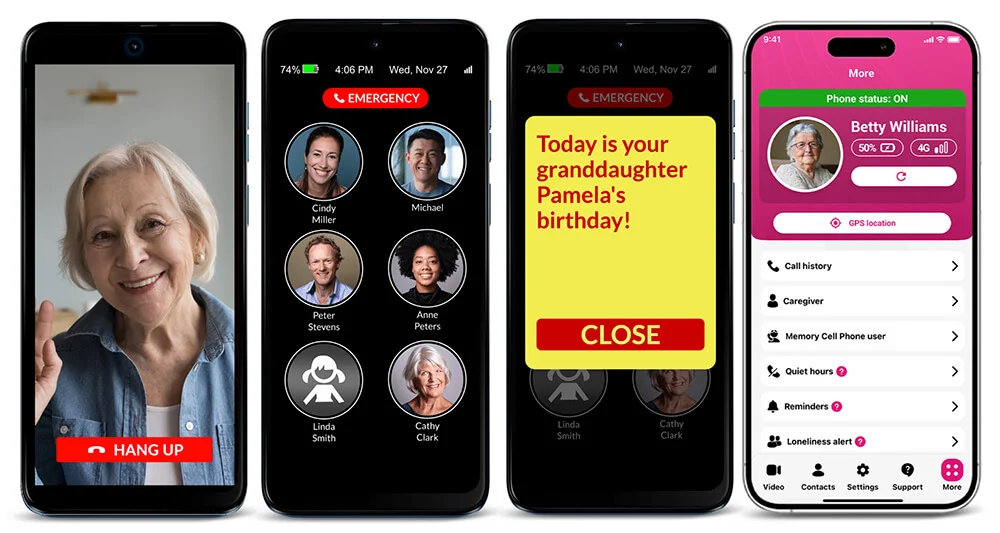
The RAZ Memory Cell Phone is designed for people who may become confused by standard menus. It can display large contact pictures, limit unnecessary functions, and allow a caregiver to manage settings remotely.
Best Easy-to-Use Smartphone for Elderly Users
An easy to use smartphone for elderly users should provide useful apps without creating a confusing experience. It should support video calls, text messages, photos, maps, and essential services while keeping navigation clear.
Jitterbug Smart5: Best Overall Easy Smartphone
The Jitterbug Smart5 is one of the strongest choices for buyers who specifically want the best cell phone for seniors rather than a regular phone that must be heavily modified.
Its main advantage is the list-based menu. Instead of filling the screen with many small app icons, the phone organizes major tools into a readable list. Calls, messages, camera functions, contacts, and settings are easier to locate.
The phone also includes voice typing, which can help users who find touchscreen keyboards difficult. Its large screen is useful for reading messages, viewing family photos, following directions, and making video calls. The speakers are designed to produce clear, strong audio.
Lively also offers optional health and safety services. The dedicated Urgent Response feature requires an eligible service upgrade, so buyers should calculate the complete monthly price rather than looking only at the phone’s purchase price.
Apple iPhone 17e: Best Familiar Smartphone
The iPhone 17e may be the best cell phone for seniors who already use an iPad, Mac, Apple Watch, FaceTime, or other Apple services. It is more expensive than many specialized senior phones, but it offers a familiar system, strong performance, USB-C charging, MagSafe wireless charging, and a durable design. Apple lists the iPhone 17e from $599 with 256GB of starting storage, although promotions and carrier financing may change the final price.
More importantly, an iPhone can be adjusted for larger text, screen zoom, spoken content, VoiceOver, Voice Control, visual alerts, hearing devices, and simplified access. A family member can remove unnecessary apps from the main screen and place Phone, Messages, Camera, FaceTime, and important contacts in easy-to-see positions.
Samsung Galaxy A27 5G: Best Affordable Android Choice
The Samsung Galaxy A27 5G is a practical choice for seniors who prefer Android. It has a large 6.7-inch display and can use Samsung’s Easy Mode, which increases icon size and simplifies the screen layout.
A Samsung phone can also be customized with larger text, higher screen contrast, magnification, hearing enhancements, voice access, and direct-dial contact widgets. It may require more setup than a Jitterbug, but it gives users access to the full Android app selection.
Best Large Button Cell Phone for Seniors
A touchscreen is not always the right answer. Some people find physical keys more comfortable and reliable, especially when they have hand tremors, arthritis, limited fingertip sensitivity, or little experience with smartphones.
A large button cell phone for seniors should have clearly separated keys that can be identified by touch. The answer and end-call keys should use familiar symbols or colors. The menu should not contain unnecessary applications, and the speaker should be loud enough for normal conversations.
Jitterbug Flip3: Best Large-Button Phone With Safety Features
The Jitterbug Flip3 is designed for older adults who want a traditional phone with modern network support. It includes tactile buttons, large text, a high-contrast screen, speed dial, a comfortable grip, a loud speaker, and simplified voice services. It is also a 5G-capable phone, helping it avoid the network problems that affect older 3G models.
This model may be the best cell phone for seniors who do not need email, social media, online banking, or many mobile apps. Opening the phone makes it easy to answer a call, while closing it clearly ends the conversation.
Lively offers optional Urgent Response services that can connect the user with trained support. However, optional safety services increase the monthly cost. Families should compare the standard service plan, safety package, activation charges, taxes, and device price before buying.
Consumer Cellular IRIS Easy Flip 2: Best Simple Flip Phone
The IRIS Easy Flip 2 is another useful choice for calls and text messages. Consumer Cellular says the newer model uses 5G voice technology to provide clearer and more reliable calling and texting.
Its straightforward design makes it suitable for someone who wants a large button cell phone for seniors without the distractions of a full smartphone. It may also cost less than buying a premium touchscreen device.
Independent senior-phone comparisons have repeatedly placed the IRIS Easy Flip family among the leading simple and big-button choices because of its basic navigation and affordable positioning.
Before choosing either flip phone, test the keypad, speaker, screen brightness, and charging method. A button that looks large in a photograph may still feel uncomfortable to a person with severe arthritis or limited hand control.
Best Cell Phone for Seniors With Memory Challenges
Standard smartphones can be difficult for someone experiencing memory loss or cognitive decline. Even simple activities may require several steps: unlock the screen, locate the phone application, open the contact list, find the correct name, and press the call button.
The RAZ Memory Cell Phone removes many of these steps. It can display approved contacts as large photographs. The user can call someone by pressing and holding that person’s picture. The home screen does not need to show distracting applications, complicated notifications, or difficult settings.
A caregiver can manage contacts, settings, reminders, quiet hours, and other functions through the RAZ Care app. This can be especially useful when the caregiver lives in another home or city. The caregiver can adjust the phone without asking the senior to follow a long series of technical instructions.
The phone also offers optional video calling, text messaging, reminders, an extra-loud speaker, wireless charging, spam-call protection, and modes for low vision or hand tremors. Caregivers can decide which features are suitable for the user.
For a person with significant memory difficulties, the best cell phone for seniors is often the device with the fewest unnecessary decisions. A phone that offers hundreds of apps may appear more powerful, but it can be less useful when the person cannot reliably reach the calling screen.
Families should still evaluate whether the user understands how to answer calls, charge the device, recognize contacts, and request emergency assistance. No phone can replace appropriate supervision, professional care, or a dedicated medical alert system when those services are needed.
The RAZ model may not be ideal for an independent senior who wants social media, advanced photography, online shopping, games, and unrestricted apps. Its value comes from simplicity and caregiver control rather than general smartphone freedom.
Senior Cell Phone Plans With No Contract
After choosing the best cell phone for seniors, buyers must select a suitable service plan. A low phone price can become expensive when it requires a costly monthly package. Always calculate the total cost over at least one year.
Consumer Cellular
Consumer Cellular offers flexible monthly service without a long-term contract. Its plans include unlimited talk and text, with entry-level options advertised from around $20 per month. Customers may be able to change plans when their data needs change. Active AARP members may qualify for certain discounts or promotions, subject to current terms.
Consumer Cellular can be suitable for light and moderate users who value telephone support and simple plan choices. It is also the carrier associated with the IRIS Easy Flip 2.
Lively
Lively provides service for Jitterbug phones and advertises no long-term contracts. The Jitterbug Flip3 page lists basic plans beginning at $14.99 per month plus taxes and fees, while optional safety and health services cost more.
Lively is a strong option when the user wants a simple phone and access to optional Urgent Response services. However, buyers should understand that Jitterbug phones generally require Lively service.
Connect by T-Mobile
Connect by T-Mobile advertises a senior plan for eligible customers aged 55 and older with unlimited talk and text, 5GB of data, no annual contract, and no credit check for $15 per month plus applicable taxes and fees. Coverage should be checked before activation, especially in rural locations.
T-Mobile Unlimited 55+ Plans
T-Mobile also offers unlimited 55+ plans for customers who need more data. Its current offer advertises two Essentials Choice 55 lines for $30 per line per month, with AutoPay requirements and additional taxes or fees depending on the plan. These plans do not require annual contracts.
This can be a better value for a senior couple than for a person who needs only one basic line.
Mint 55+
Mint Mobile advertises a Mint 55+ option with unlimited talk and text beginning at $15 per month. Mint typically uses prepaid multi-month pricing, so customers should check how much must be paid in advance, what the renewal price will be, and whether the service works well at their address.
When comparing senior cell phone plans no contract, examine:
- Coverage at home and frequently visited locations
- Price after promotional periods
- Taxes, activation charges, and service fees
- Amount of high-speed data
- Mobile hotspot availability
- International calling needs
- Customer support options
- Emergency-service costs
- Whether the current number can be transferred
- Whether the phone is locked to one carrier
The cheapest plan is not always the best plan. Reliable local coverage is more important than saving a few dollars on service that regularly drops calls.
How to Choose the Best Cell Phone for Seniors?
The easiest way to choose the best cell phone for seniors is to begin with the person’s daily routine rather than a list of technical specifications.
First, decide whether the user needs a smartphone. Someone who only makes calls may be happier with a flip phone. A senior who uses video chat, online appointments, navigation, email, photos, and banking will need a smartphone.
Next, consider vision. Ask the user to read a sample message, contact name, and battery indicator. Increase the font size during the test. Check whether the display remains clear in bright light.
For hearing needs, test both normal calling and speakerphone mode. Confirm hearing-aid compatibility with the phone manufacturer, carrier, or hearing-care professional. Compatibility can vary between phones and hearing devices, so testing the actual combination is better than relying only on a general product label.
For hand movement, ask the user to unlock the phone, enter a number, answer a call, and connect the charger. A large button cell phone for seniors may be appropriate when these tasks are uncomfortable on a touchscreen.
Memory and decision-making should also influence the choice. A simplified photo-contact phone may be safer than a regular smartphone for someone who repeatedly becomes lost in menus, changes settings accidentally, or responds to suspicious messages.
Use this practical checklist before buying:
- Can the user answer a call without help?
- Can they call a favorite contact?
- Can they read the screen comfortably?
- Can they hear the ringtone and conversation?
- Can they charge the phone independently?
- Is the phone comfortable to hold?
- Does it have reliable coverage at home?
- Can unwanted apps and notifications be removed?
- Is spam-call protection available?
- Is family support available for setup and updates?
- Is the full monthly cost affordable?
- Does the phone support 4G or 5G service?
A phone should increase independence. When a device creates daily stress, it is probably not the best cell phone for seniors, even when its technical specifications look impressive.
How to Set Up an Easy-to-Use Smartphone for an Elderly Person?
A regular smartphone can become an easy to use smartphone for elderly family members when it is configured carefully.
Begin by increasing the font and display size. On an iPhone, these controls are available under Accessibility and Display settings. On Android, users can adjust font size, display size, magnification, contrast, captions, and other accessibility tools. Samsung Galaxy phones also offer Easy Mode, which provides larger icons and a simpler layout.
Remove applications that the person does not use. Keep the first screen limited to essential tools such as:
- Phone
- Messages
- Camera
- Photos
- Video calling
- Maps
- Calendar
- Weather
- Medical or pharmacy applications
- Emergency information
Add favorite contacts to the home screen. Use clear photographs when the phone supports contact widgets. Create speed-dial entries for close family members, doctors, caregivers, neighbors, and transportation services.
Turn on automatic software updates, but explain that legitimate updates should come through the phone’s settings—not through unexpected text-message links. Enable spam-call filtering and silence unknown callers only when doing so will not block important calls from clinics, delivery drivers, or caregivers.
Set up emergency contacts and medical information. Test the phone’s emergency-calling features before relying on them. An optional emergency button can provide extra support, but it should not create a false sense of security.
Use a strong protective case and screen protector. A bright case can make the phone easier to find. A charging cradle or wireless charging pad may also be easier than a small cable.
Finally, write a one-page instruction sheet covering how to answer, call, charge, and return to the home screen. A carefully prepared mid-range phone can sometimes become the best cell phone for seniors without requiring a specialized device.
Safety, Privacy, and Scam Protection
Safety should be considered when selecting the best cell phone for seniors. Older adults are frequently targeted by impersonation calls, fake technical support messages, romance scams, investment fraud, prize notices, and urgent payment requests.
A senior should never provide a password, verification code, Social Security number, banking PIN, or gift card number to an unexpected caller. Legitimate organizations generally do not demand immediate payment through gift cards, cryptocurrency, or wire transfers.
The National Council on Aging advises users not to click or respond to suspicious links, attachments, calls, or pop-up messages. It reported that adults aged 60 and older collectively lost billions of dollars to online scams in 2024.
Helpful protections include:
- Spam-call identification
- Automatic security updates
- A device passcode
- Fingerprint or facial recognition
- Account recovery information
- Two-factor authentication
- Limited app permissions
- Purchase approval controls
- Location sharing with trusted relatives
- Regular account and bill reviews
Family members should avoid taking complete control unless it is necessary and agreed upon. The goal is to support the senior’s independence while reducing risk.
For someone with memory difficulties, caregiver-managed settings may be appropriate. The RAZ Memory Cell Phone, for example, allows caregivers to control contacts and selected features remotely.
The best cell phone for seniors should also receive security updates. Very old phones may stop receiving software protection even when they still turn on. Buyers should ask how long the model will receive operating-system and security updates.
Frequently Asked Questions
What is the best cell phone for seniors in 2026?
The Jitterbug Smart5 is a strong overall choice for someone who wants an easy smartphone with large text, straightforward navigation, voice typing, video chat, and optional safety services. The Jitterbug Flip3 or IRIS Easy Flip 2 may be better for someone who only needs calls and texts. The RAZ Memory Cell Phone is designed for people who need photo contacts and caregiver controls. The best cell phone for seniors ultimately depends on the user’s abilities and routine.
What is the easiest smartphone for an elderly person?
The Jitterbug Smart5 is one of the easiest specialized smartphones because it uses a simple list-based menu. An iPhone or Samsung Galaxy phone can also become an easy to use smartphone for elderly users after unnecessary apps are removed and accessibility settings are enabled.
Is a flip phone better than a smartphone for seniors?
A flip phone is often better for a person who only calls and sends basic text messages. Physical buttons can be more comfortable than a touchscreen. A smartphone is better for video calling, maps, email, online appointments, photos, and applications.
What is the best large-button phone for seniors?
The Jitterbug Flip3 is a leading large button cell phone for seniors because it combines tactile keys, high-contrast text, a loud speaker, simple navigation, 5G service, and optional Urgent Response support. The IRIS Easy Flip 2 is another practical option for straightforward calling and texting.
How much data does a senior need?
A person who mainly calls and texts may need little or no mobile data. Occasional maps, photos, email, and browsing may fit within 3GB to 5GB per month. Frequent video calling, streaming, or hotspot use may require 10GB, 20GB, or unlimited data. Check actual usage before paying for a larger plan.
Are there senior cell phone plans with no contract?
Yes. Consumer Cellular, Lively, T-Mobile, Connect by T-Mobile, and other providers offer month-to-month, prepaid, or no-annual-contract choices. The exact meaning of “no contract” varies. A customer may still have a monthly service agreement or device-financing balance. Always read the cancellation and device-payment terms when comparing senior cell phone plans no contract.
Can seniors keep their current phone number?
In many cases, yes. Do not cancel the old service before the transfer is complete. The new carrier may need the current account number, transfer PIN, billing ZIP code, and account-holder information.
What phone is suitable for a senior with dementia?
The RAZ Memory Cell Phone is specifically designed for users who benefit from photo contacts, limited menus, reminders, and remote caregiver management. The correct choice depends on the person’s abilities and level of support.
Should a senior phone have 5G?
A senior does not necessarily need the fastest 5G data speeds, but the phone should support a current network. Avoid buying an old 3G-only phone. A modern 4G LTE or 5G device is more likely to remain usable.
Can a regular Android phone be made senior-friendly?
Yes. Increase the text and display size, enable magnification or Samsung Easy Mode, add direct-dial contacts, remove unnecessary apps, turn on spam protection, and keep essential applications on the first screen.
Do all senior phones work with hearing aids?
No. Compatibility can vary by phone, carrier technology, hearing aid, and listening environment. Check the hearing-aid compatibility information and test the phone with the user’s actual hearing device before completing the purchase.
Final Recommendation
For most older adults who want smartphone features, the Jitterbug Smart5 is a practical starting point. It provides an easier interface than many regular smartphones while still supporting messages, video calls, maps, photos, and safety services.
For a person who only needs calling and basic texting, the Jitterbug Flip3 or Consumer Cellular IRIS Easy Flip 2 may be the best cell phone for seniors. Both avoid the complexity of a full app-based smartphone.
For an experienced smartphone user, the iPhone 17e or Samsung Galaxy A27 5G can provide more freedom, better app access, and strong accessibility settings. The iPhone is especially useful for someone already connected to Apple products, while the Samsung is a flexible Android choice that can be simplified with Easy Mode.
For memory challenges, the RAZ Memory Cell Phone offers a different kind of value. Its photo-contact screen and remote caregiver management focus on reducing confusion rather than adding more functions.
Before making the final decision, let the senior hold and test the phone. Confirm the coverage, charging method, speaker volume, screen readability, hearing-aid support, return policy, and complete monthly cost.
The best cell phone for seniors is not the phone with the longest feature list. It is the phone the person can use comfortably, confidently, and independently.
Author

admin@myncblogs.com