- 0
- 4,571 words
Buying a phone for an older adult is not only about choosing the largest screen or the cheapest monthly plan. The best Jitterbug phone reviews begin with the senior’s real daily needs. The phone must be easy to understand, comfortable to hold, loud enough to hear, and dependable when help is needed. These Jitterbug phone reviews examine the devices from that practical point of view.
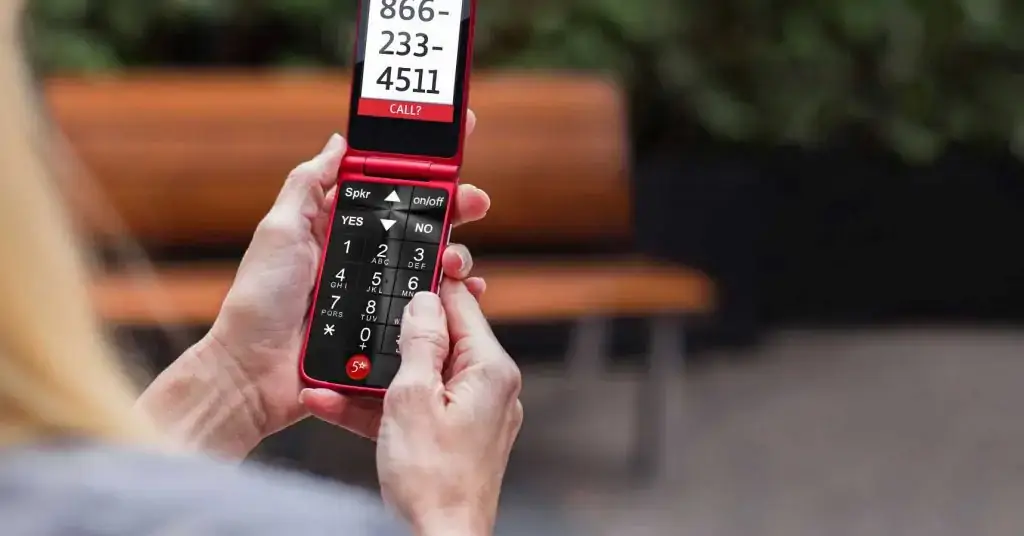
Jitterbug phones are designed for older adults who may find normal smartphones too complicated. They use larger text, simplified menus, clear speakers, and easy access to support. Some plans also include health and safety services, such as Urgent Response and caregiver alerts.
Lively, formerly known as GreatCall, created the Jitterbug line and is now part of Best Buy Health. The brand says it introduced the first Jitterbug phone in 2006 and continues to focus on helping older adults stay connected and independent.
There is one important point to understand before comparing models. Searches for Jitterbug Flip vs Smart2 usually refer to older phones. The Smart2 and original Jitterbug Flip are now listed by Lively as older products.
In 2026, Lively introduced the Jitterbug Flip3 and Jitterbug Smart5, while it also continued to display remaining Flip2 and Smart4 inventory.
For that reason, this Jitterbug phone reviews guide covers both the older comparison people still search for and the current choices available to new buyers. It also explains prices, plans, safety services, strengths, limitations, and the type of senior each model suits best.
Quick Verdict: What Jitterbug Phone Reviews Reveal?
Most Jitterbug phone reviews reach a similar conclusion: these phones are strong choices for seniors who value simplicity, readable screens, clear sound, and access to human support. They are less suitable for buyers who want premium cameras, fast processors, advanced apps, or the freedom to use any carrier.
The flip-phone option is usually best for a person who mainly makes calls, sends occasional texts, and wants physical buttons. The smartphone option is better for someone who wants video calls, photos, maps, email, web browsing, and apps but needs a simpler layout than a standard Android phone.
Independent reviewers have generally praised the Jitterbug line for its senior-friendly design and emergency features. SeniorLiving.org recommends the Flip2 or Smart4 for people seeking simple phones with medical-alert-style features, while The Senior List gives the line strong marks for intuitive interfaces and safety tools.
At the same time, independent reviews warn buyers to understand activation charges, plan fees, data costs, and possible overage or billing issues before ordering.
Here is the practical decision:
| User need | Better choice |
|---|---|
| Calls, simple texting and physical keypad | Jitterbug Flip model |
| Large touchscreen and apps | Jitterbug Smart model |
| Lowest starting monthly cost | Flip-phone plan |
| Video calling and internet access | Smart model |
| Easier use with limited hand movement | Depends on whether buttons or voice control feel easier |
| Advanced camera and fast performance | Consider a mainstream smartphone |
| One-button access to emergency help | Either model with an eligible service plan |
Across trustworthy Jitterbug phone reviews, the strongest reason to buy a Jitterbug is not raw technology. It is the combination of a simplified phone, senior-focused customer support, and optional safety services.
The biggest weakness is that the total cost can rise after adding an upgraded plan, data, taxes, fees, and optional services.
What Is a GreatCall Phone for Seniors?
A GreatCall phone for seniors is the older name many people still use for a Jitterbug phone. GreatCall created the Jitterbug brand, later became Lively, and joined Best Buy Health in 2018.
The current company officially describes itself as Lively, formerly GreatCall.
The original goal was simple: make mobile phones less confusing for older adults. Instead of filling the screen with small icons and complicated settings, Jitterbug phones use clearer menus and larger text.
Flip models add large physical buttons, while smartphone models use a list-style home screen that places common actions in an easy-to-read order.
A GreatCall phone for seniors is different from a normal prepaid phone in three important ways. That distinction is central to accurate Jitterbug phone reviews.
Senior-friendly hardware
The device itself is designed around common age-related needs. These may include reduced eyesight, hearing difficulty, arthritis, lower hand strength, or limited experience with smartphones.
The Flip2, for example, has a 3.2-inch inside screen, a large keypad, a front-facing speaker, Bluetooth, GPS, and an M4/T4 hearing-aid compatibility rating.
Lively phone service
Jitterbug phones work with Lively service plans. They are not simply unlocked phones that can be moved freely to any carrier.
Buyers should check coverage in the senior’s ZIP code and understand the monthly plan before purchasing. Lively says an existing eligible number can usually be transferred without a transfer fee, although the old carrier may charge an early termination fee.
Optional health and safety services
Eligible plans can add support services. Urgent Response connects the user to trained agents, while the Lively Link app can provide caregiver alerts.
Other plan levels may include services such as:
- Nurse On-Call
- Care Advocate
- Ask Lively
- Lively Rides
- Emergency assistance
- Caregiver notifications
Availability depends on the selected plan and current service terms.
These points explain why Jitterbug phone reviews often evaluate the phone and service together. Reliable Jitterbug phone reviews should never judge the hardware price alone.
The hardware may be inexpensive, but the overall experience depends heavily on the monthly plan, local coverage, support quality, and whether the senior will actually use the safety features.
Jitterbug Flip vs Smart2: Which Is Easier for Seniors?
The Jitterbug Flip vs Smart2 comparison is still popular because it represents the basic decision many families face: physical flip phone or simplified smartphone. Many older Jitterbug phone reviews use these two models as the starting point.
However, both names refer to older generations. Lively now places the original Jitterbug Flip and Smart2 in its older-products section. New buyers should use the comparison to understand the two device types and then compare current models such as the Flip3 and Smart5.
Design and navigation
The Jitterbug Flip is easier for a senior who recognizes a traditional telephone keypad. Opening the phone can make answering an incoming call feel natural, while closing it provides a clear indication that the call has ended.
Physical buttons also give tactile feedback. This can be helpful for users who struggle with touchscreens, accidental taps, small icons, or poor hand control.
The Smart2 uses a touchscreen and offers more features. Its large display, list-based menu, loud speaker, camera, and access to health services made it easier than many standard smartphones of its time.
However, it still required users to:
- Tap and swipe
- Charge a larger touchscreen device
- Manage notifications
- Use an on-screen keyboard
- Understand basic Android behavior
- Open and close applications
Independent Smart2 reviews often praised the bright screen and simple applications but criticized its slow processor and complicated pricing structure.
Calling and texting
For calls, the Flip is usually simpler. The physical keypad makes dialing familiar, and common contacts can be added to speed dial.
For texting, the answer depends on the person. Some seniors prefer pressing number keys several times to type letters. Others find that process slow and would rather use a touchscreen keyboard or voice typing.
A caregiver should ask the senior to try both methods instead of assuming that physical buttons are always easier.
Internet access and applications
The Smart2 is the better type of phone for:
- Video calls
- Web browsing
- Maps and directions
- Photos
- Online appointments
- Weather information
- Mobile applications
The Flip is better for someone who becomes distracted or confused by notifications, application icons, passwords, pop-ups, software updates, and accidental screen touches.
Current equivalent: Flip3 vs Smart5
The newer Flip3 adds 5G, Wi-Fi calling, spam blocking, a higher-contrast display, a clearer speaker, 64GB of storage, and up to 12 hours of talk time.
The Smart5 adds a 6.75-inch screen, 5G, Wi-Fi calling, a 50MP rear camera, 128GB of storage, voice typing, video chat, and up to two days of typical usage.
Therefore, the conclusion found across many Jitterbug phone reviews remains simple: choose the Flip style for basic communication and choose the Smart style for online features.
For a new purchase, compare the newest available versions rather than buying an old Smart2 unless the price, support, battery condition, and network compatibility have been carefully checked.
Ease of Use, Display, Sound, Battery and Safety Features
Useful Jitterbug phone reviews should go beyond a list of specifications. The most helpful Jitterbug phone reviews explain what those specifications mean in everyday use.
A senior-friendly phone must work well during normal daily activities and during stressful moments.
Ease of use
According to many Jitterbug phone reviews, the strongest part of the Jitterbug design is its reduced complexity.
Menus use plain language instead of relying only on unfamiliar symbols. Common actions such as calling, texting, viewing contacts, taking a photo, and requesting help are easier to find.
The Flip models are usually the safer recommendation for a person who has never used a smartphone. Large, backlit buttons reduce the chance of pressing the wrong number.
A charging dock included with some older packages can also be easier than inserting a small cable each day.
The smartphone models are still easier than many standard Android phones, but they are not completely effortless. Users must understand:
- Tapping
- Scrolling
- Charging
- Volume controls
- On-screen keyboards
- Notifications
- Passwords
- Basic application management
A simplified smartphone is still a smartphone. Families should allow time for training and practice.
Display and readability
The Flip2 has a 3.2-inch internal screen. Its menus use large text and clear selections.
The Smart4 uses a 6.6-inch screen, while the newer Smart5 increases the screen size to approximately 6.75 inches and continues to use a large, list-based interface.
Large text helps, but families should test more than font size.
Check whether the senior can:
- Read the caller’s name
- See the battery percentage
- Recognize missed calls
- Read a complete text message
- Find the home screen
- Locate the volume controls
- Understand whether the phone is charging
Glare, screen brightness, color contrast, and indoor lighting can affect readability even when the text is large.
Sound and hearing support
The Flip2 includes a front-facing speaker and an M4/T4 hearing-aid compatibility rating.
The Smart4 includes dual speakers, real-time call captioning, and voice typing. The Smart5 also includes powerful dual speakers and hearing-aid compatibility.
Before purchasing, test whether the senior can hear speech clearly in a quiet room and in a noisy environment. Also check whether the ringtone is loud enough to hear from another room.
Hearing-aid compatibility ratings are useful, but individual hearing aids and hearing conditions differ. A real call test provides more useful information than specifications alone.
Battery life and charging
In Jitterbug phone reviews, battery claims should be treated as estimates because real performance changes according to:
- Signal strength
- Screen brightness
- Call duration
- Wi-Fi use
- Applications
- Video calls
- Battery age
- Charging habits
Lively lists up to 12 hours of talk time for the Flip3 and gives it a 3,000mAh battery.
The Smart5 has a 5,010mAh battery and is promoted for up to two days of typical usage.
Older batteries may hold less power, especially when purchasing a used or discontinued Smart2.
For seniors who regularly forget to charge devices, place the charger in the same visible location every day. A bedside table or kitchen counter may work better than a charger hidden behind furniture.
Performance
Jitterbug phones provide adequate performance for calling and basic daily tasks. However, older Smart models may feel slow compared with modern iPhones and mainstream Android phones.
Several independent Jitterbug phone reviews mention slower data processing or slower performance as a limitation.
A slower device may still be acceptable for a senior who only checks email, views photos, and makes video calls. It may become frustrating for someone who regularly switches between applications or expects instant performance.
Safety services
Urgent Response is one of the main reasons families choose Jitterbug, and it deserves special attention in Jitterbug phone reviews.
Urgent Response can connect the user with trained agents who can assess a situation and contact appropriate help. However, it requires an eligible service plan, a charged phone, available connectivity, and access to the device.
It should not be treated as a guarantee that every emergency call will connect from every location. Lively states that Urgent Response is included with certain higher plan levels rather than every basic plan.
Before relying on the phone:
- Practice using the help button
- Confirm the home address
- Add emergency contacts
- Test coverage around the house
- Check coverage in the yard and garage
- Teach the senior when to call 911 directly
- Make sure the phone is carried rather than left in another room
A safety feature only helps when the user understands it and has the device nearby.
Jitterbug Plans, Prices and the Real Monthly Cost
Many positive Jitterbug phone reviews focus on the low purchase price. Complete Jitterbug phone reviews also calculate the long-term service cost.
The device price is only the first part of the total cost.
As of July 2026, Lively listed the new Jitterbug Flip3 at $79.99 and the Smart5 at $119.99. Promotional prices and older inventory can change quickly, so buyers should check the final checkout price rather than relying on an old review.
Lively’s published plan comparison showed the following starting monthly prices:
| Plan type | Basic | Preferred | Premium |
|---|---|---|---|
| Flip-phone plans | $14.99 | $34.99 | $44.99 |
| Smartphone plans | $19.99 | $39.99 | $49.99 |
The cheapest flip plan included 300 minutes and 300 texts in the published comparison.
Unlimited talk and text, health services, and mobile data allowances vary according to the selected plan. Taxes, regulatory charges, optional data, and other fees can increase the final bill.
How to calculate the first-year cost
Before purchasing, use this calculation:
Phone price + activation or setup charges + 12 months of service + taxes and fees + optional protection plan + accessories
A low device price does not necessarily make the total service inexpensive.
For example, a buyer may need a Preferred or Premium plan to access Urgent Response, caregiver notifications, or medical support. In that situation, the monthly plan is more important than the original phone price.
However, the higher monthly price may still provide reasonable value for a family that would otherwise pay separately for a phone plan and a mobile medical-alert service.
Questions to ask before activation
- Does the senior need unlimited calls and texts?
- How much mobile data will video calls use?
- Is Urgent Response included?
- Does the plan include caregiver alerts through Lively Link?
- Is Nurse On-Call included?
- Are there activation or shipping fees?
- Is there an extra charge for paper billing?
- Are regulatory fees added?
- Can the plan be changed later?
- Can the service be canceled without a long contract?
- What is the return window?
- Does the return period begin at purchase or activation?
- Is equipment replacement covered?
- How much does the protection plan cost?
The best Jitterbug phone reviews should make this clear: informed Jitterbug phone reviews compare the entire package.
A basic user who only makes a few calls may find the starting price attractive. A user who needs multiple safety and support services should compare the complete monthly cost with Consumer Cellular, a traditional carrier senior plan, or a separate medical-alert system.
Pros and Cons Found in Jitterbug Phone Reviews
No phone is right for every older adult, which is why balanced Jitterbug phone reviews must include disadvantages.
The following benefits and limitations appear repeatedly in expert testing and customer feedback.
Main advantages
Simple menus
The list-style layout is easier to understand than a screen filled with small application icons.
Important features are presented using clear words, helping users find calls, messages, contacts, cameras, and support.
Large controls
Flip models use large physical buttons. Smartphone models use large text and simplified navigation.
These features may help people with reduced eyesight, arthritis, hand tremors, or limited touchscreen experience.
Clearer communication
Loud speakers, hearing-aid compatibility, call captioning on some models, and voice typing can help users with hearing, vision, or dexterity challenges.
Human assistance
Lively’s support services can help with phone questions, directions, contacts, and emergencies, depending on the plan.
Lively says its Care Advisors are based in the United States.
Caregiver features
The Lively Link service can send information to approved family members when certain emergency events occur.
This can provide reassurance for families supporting someone who lives alone.
Affordable hardware
The phone itself usually costs less than a premium iPhone or Samsung Galaxy device.
This can make the initial purchase easier, although the monthly service must still be considered.
Main disadvantages
Limited carrier choice
Jitterbug phones require Lively service at activation. Buyers cannot automatically treat them like ordinary unlocked devices that can be moved to another carrier.
Monthly costs can increase
Safety services, caregiver features, unlimited communication, and data may require higher plan levels.
Older smartphones can be slow
Independent reviewers have noted slower processing, especially on earlier Smart devices.
Not ideal for advanced users
A senior who already uses an iPhone or full Android smartphone may find the simplified system restrictive.
Advanced users may prefer the faster performance, better cameras, broader application support, and greater accessory choice available with mainstream phones.
Mixed customer-service reports
Consumer complaint pages include reports involving:
- Billing problems
- Device failures
- Difficult resets
- Lost contacts
- Unwanted calls
- Charging issues
- Confusing support experiences
These reports do not prove that every customer will have the same problem. However, they demonstrate why families should monitor the first bills, save purchase records, and test the phone during the return period.
Balanced Jitterbug phone reviews should not ignore these complaints. Honest Jitterbug phone reviews separate repeated concerns from isolated experiences.
The phone’s senior-friendly design is real, but ease of use can be reduced by poor coverage, unexpected charges, setup errors, or a faulty device.
A responsible buyer should test the exact phone in the senior’s normal environment rather than assuming that a well-known senior brand will automatically work for everyone.
Is It the Best Simple Flip Phone for Elderly Users?
Many Jitterbug phone reviews conclude that the Jitterbug Flip line is a strong candidate for the best simple flip phone for elderly users, especially when safety support matters.
The large keypad, readable screen, loud speaker, one-touch calling features, hearing support, and optional Urgent Response service address many common problems seniors face.
It is especially suitable for an older adult who:
- Primarily makes and receives calls
- Sends only short text messages
- Prefers real buttons over a touchscreen
- Has difficulty seeing small icons
- Needs louder call audio
- Wants family members to receive safety alerts
- Lives independently
- May benefit from emergency support
- Becomes confused by application stores
- Has difficulty remembering passwords
- Does not want frequent software notifications
However, “best” depends on the individual.
A person with severe memory loss may need an even simpler phone that permits calls only to approved contacts. A person with very low vision may benefit from a voice-first device.
Someone who frequently uses WhatsApp, banking applications, telehealth platforms, or family video calls may be happier with a simplified smartphone.
A technically confident senior may get better performance and broader application support from an iPhone or mainstream Android device with accessibility settings enabled.
Improvements in the Flip3
The new Flip3 improves the case for Jitterbug by adding:
- 5G connectivity
- Wi-Fi calling
- Spam blocking
- Stronger sound
- Higher-contrast screen
- Large backlit buttons
- Improved navigation
These additions address practical concerns such as weak indoor signal, unclear calls, unwanted calls, and scam attempts.
Still, Jitterbug phone reviews cannot replace a real-use test when selecting the best simple flip phone for elderly buyers.
Ask the senior to complete these tasks:
- Open and unlock the phone.
- Call a family member.
- Answer an incoming call.
- End the call.
- Adjust the volume.
- Read a text message.
- Send a short reply.
- Charge the phone.
- Find an important contact.
- Locate the emergency help button.
Observe where confusion occurs.
The most important lesson from Jitterbug phone reviews is that family members should not choose a phone based only on age.
A 90-year-old who uses a tablet every day may prefer the Smart model. A 68-year-old with arthritis or early cognitive decline may find the Flip easier.
Match the phone to ability, comfort, and daily routine.
How to Choose and Set Up a Jitterbug Phone?
A careful setup process can prevent many problems mentioned in negative Jitterbug phone reviews. Practical Jitterbug phone reviews should therefore include setup advice.
Do not hand the unopened phone to the senior and expect the simplified design to solve every problem.
Check coverage first
Start by checking coverage at the senior’s:
- Home
- Bedroom
- Kitchen
- Yard
- Garage
- Nearby store
- Doctor’s office
- Family member’s home
- Frequently visited locations
Lively provides a coverage checker, but a coverage map cannot show every indoor dead zone.
Lively also says the newer Flip3 and Smart5 support Wi-Fi calling, which may improve calls where the cellular signal is weak and a stable Wi-Fi connection is available.
Choose the correct plan
Select the plan based on actual needs.
Do not pay for Premium services that will never be used. At the same time, do not select Basic if the main reason for purchasing the phone is emergency response or caregiver notifications.
Review every included feature before activating the device.
Transfer the existing number carefully
Transfer the senior’s existing number before canceling the old service. The old number normally must remain active and eligible during the transfer process.
Keep a recent bill from the previous carrier because account details may be required.
Add important contacts
Add five to ten important contacts using clear names, such as:
- Daughter Anna
- Son Michael
- Dr. Lee
- Neighbor Sam
- Pharmacy
- Home Nurse
Avoid adding too many contacts during the first setup. A long contact list may make navigation more difficult.
Adjust accessibility settings
Increase the text size, call volume, ringtone volume, and screen brightness.
For the smartphone model, remove unnecessary notifications and place the most important features near the top of the menu.
Practice charging
Ask the user to connect the charger or place the phone in its charging dock several times.
Place the charger in the same visible location every day. Avoid moving it between rooms.
Test the safety features
Test Urgent Response according to Lively’s instructions. Make sure the senior understands the difference between calling a family member, contacting Urgent Response, and calling 911.
Create a simple instruction card
Prepare a one-page instruction card using large text and pictures.
Include:
- How to answer a call
- How to end a call
- How to charge the phone
- How to call family
- How to change the volume
- How to use the help button
- What to do when the battery is low
Review the first bills
Check the first two monthly bills for unexpected fees, added services, or incorrect plan details.
Finally, schedule a check-in after one week. Ask what feels difficult rather than asking only, “Do you like the phone?”
Small changes to volume, contacts, shortcuts, or plan settings can turn a frustrating device into a useful one.
Frequently Asked Questions
Are Jitterbug phones only for seniors?
This question appears often in Jitterbug phone reviews. No. Anyone can purchase a Jitterbug phone, but the design and services are aimed mainly at older adults and people who prefer simple technology. Many Jitterbug phone reviews also recommend them for users with limited vision, hearing difficulty, reduced dexterity, or little smartphone experience.
Is GreatCall still in business?
The GreatCall name was replaced by Lively. Lively describes itself as formerly GreatCall and says it joined Best Buy Health in 2018. People still use the phrase GreatCall phone for seniors because that was the brand name for many years.
What is the difference between Jitterbug Flip and Smart2?
In the traditional Jitterbug Flip vs Smart2 comparison, the Flip has physical buttons and focuses on calls and simple texts. The Smart2 has a touchscreen, internet access, applications, email, camera functions, and other smartphone tools. Both are older models, so new buyers should compare the current Flip3 and Smart5.
Can I use a Jitterbug phone with another carrier?
Current product pages state that a Lively service plan is required at activation. Buyers seeking an unlocked phone for another network should choose a different device unless Lively confirms compatibility in writing.
Can I keep my current phone number?
Usually, yes, provided that the number is active and eligible. Lively says it does not charge a transfer fee, but the previous carrier may charge an early termination fee. Do not cancel the old service until the transfer has been completed.
Does every Jitterbug plan include emergency response?
No. Lively’s plan comparison shows that Urgent Response is tied to certain higher plan levels. Confirm the exact service list before activation because plan names, prices, and features can change.
Is the Jitterbug Flip good for a senior with dementia?
It may be easier than a smartphone because it has a familiar keypad and fewer distractions. Caring.com has recommended the Flip2 for some seniors with dementia because of its simple design, GPS, and caregiver features. However, dementia needs differ widely, and some people may require a more restricted phone with approved contacts only.
Is a Jitterbug a medical-alert system?
It is a phone with optional emergency and caregiver services. It is not identical to every dedicated wearable medical-alert device. The phone must be charged, within reach, connected to service, and paired with an eligible plan. A person at high risk of falling may also need a wearable alert device with automatic fall detection.
Does Jitterbug work without a monthly plan?
The phone requires Lively service for normal cellular use. The device purchase price does not include permanent calling, texting, data, or safety service. Review the monthly cost before purchasing.
Can family members track a Jitterbug phone?
The Lively Link service can provide approved caregivers with certain alerts and location-related information when included with the appropriate plan and correctly configured. Access is not automatically available to every family member.
Which Jitterbug phone is best?
The answer in most Jitterbug phone reviews depends on the user. The Flip model is best for calls, physical buttons, and minimum complexity. The Smart model is best for video calls, photos, maps, email, internet access, and applications. Current Jitterbug phone reviews should compare the newest available devices rather than focusing only on old Smart2 and Flip models.
Final Verdict
After comparing design, cost, support, safety tools, and common complaints, these Jitterbug phone reviews support a qualified recommendation. This conclusion also matches the broad pattern found in current Jitterbug phone reviews.
Choose a Jitterbug Flip model when the senior wants:
- A familiar phone
- Large physical buttons
- Simple calling
- Limited texting
- Clear sound
- Optional access to emergency help
It is one of the strongest choices for families searching for the best simple flip phone for elderly users.
Choose a Jitterbug Smart model when the senior wants modern communication tools but finds a normal Android phone overwhelming.
The simplified menu, large screen, voice features, video calling, and support services can make the transition to a smartphone easier.
Do not purchase either model only because it is marketed to seniors.
Before deciding:
- Check local coverage
- Compare the complete monthly cost
- Confirm which safety services are included
- Test hearing-aid compatibility
- Read the return terms
- Review possible additional fees
- Involve the senior in the decision
- Test the phone in everyday situations
The older Jitterbug Flip vs Smart2 comparison still provides a useful rule: Flip means maximum simplicity, while Smart means greater capability.
For a current purchase, the Flip3 and Smart5 are the more relevant models.
The right choice is the phone the senior can confidently answer, charge, carry, hear, and use for help without depending on someone else every day. That is the most useful standard any Jitterbug phone reviews article can apply.
Author

admin@myncblogs.com
Related Posts
Best Cell Phone for Seniors: Easy Smartphones and Large-Button Phones for 2026
- 0
- 3,993 words
Choosing the best cell phone for seniors is not simply about finding the newest or most expensive device. A good senior-friendly phone...
Read out all