
- 0
- 3,017 words
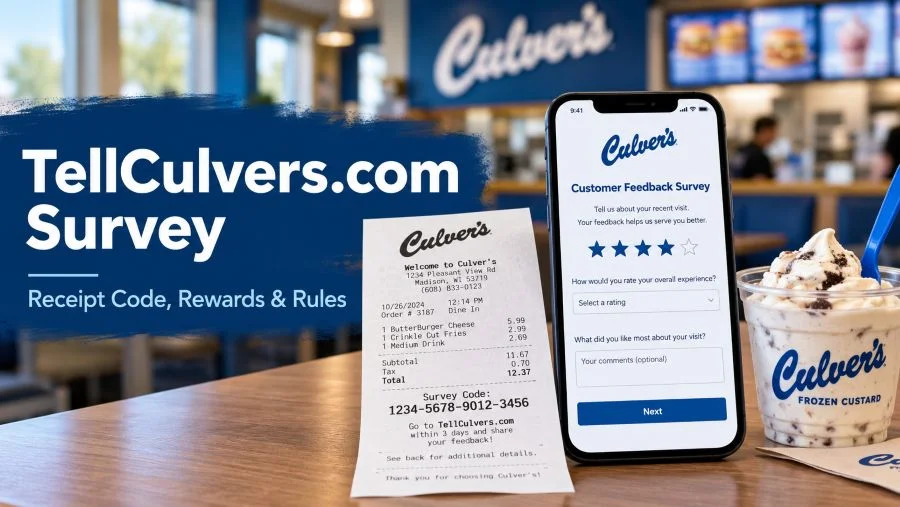
To use the tellculvers.com survey, keep a Culver’s receipt bearing a survey invitation, go to https://www.tellculvers.com/, enter the 15-character survey code requested by the live official form, answer the feedback questions, and write the resulting validation code on your receipt. The code is used for the specific offer printed on that receipt; no universal dessert reward is guaranteed.
The main purpose of this guide is to help a guest move from a recent meal to a completed feedback survey without confusing survey invitations with ordinary order numbers. It follows the order in which most visitors need the information: check the receipt, confirm the website, submit genuine feedback, save the validation code, and read the redemption terms.
Survey facts at a glance
| Survey | Culver’s Guest Satisfaction Survey |
| Verified entry address | https://www.tellculvers.com/ |
| Entry code on live page | 15 characters |
| Important character warning | Do not use the letter O |
| Completion result | Validation code for the offer printed on your receipt |
| Offer, expiration, eligibility | Read the receipt and any on-screen terms |
| General assistance | https://www.tellculvers.com/contact-us |
Complete step-by-step guide: www.tellculvers.com survey enter code
What is confirmed and what is not?
The official welcome page asks visitors to enter a 15-character survey code printed on a receipt. It expressly instructs visitors not to use the letter O when typing that code. After completion, the page says it provides a validation code for the offer printed on the receipt. Those statements are directly visible on the survey portal.
Third-party websites sometimes describe an 18-digit entry code, a universal free custard reward, fixed age limits, or a particular number of hours before expiration. These details should not be copied as universal rules. The exact invitation and promotion terms available to a guest are more important than a generic blog claim.
Before you open the survey
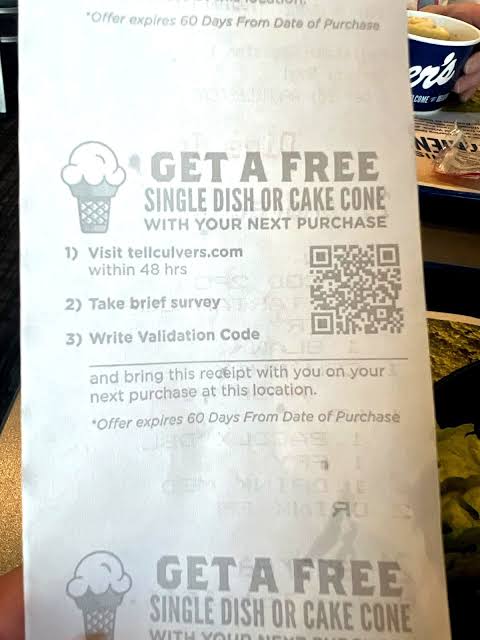
Locate the purchase receipt and look for the survey invitation. Read the offer text all the way through, including any small print concerning location, eligible products, dates, purchase requirements, or exclusions. A receipt without a survey invitation may not be accepted. Keep the paper receipt because the official survey instructs you to write the validation code on it after completing the questions.
Choose a time when you can concentrate on the visit you are rating. Think about what you ordered, whether the food matched the order, how the service felt, and what would have improved the meal. A few specific details will make your responses more useful than simply selecting the highest or lowest rating for every question.
Step 1: identify the correct receipt code
Find the block of text that invites you to complete a guest satisfaction survey. The survey code is not necessarily the transaction number, order number, store number, or payment reference. Compare the printed characters with the official entry field, which currently requests 15 characters. If the receipt is crumpled, smooth it out and read it under good light.
Do not publish your entire receipt or share the survey code in a public comment. A unique survey code may be connected to a single transaction, and someone else using it could make your entry unusable. If the invitation shows a different format, follow what the live official portal requests and ask the restaurant for clarification rather than making up missing characters.
Step 2: navigate to the real entry page
Open a browser and type https://www.tellculvers.com/ into the address bar. Verify that the domain is exactly tellculvers.com rather than a similar-looking address with extra words, dashes, or a different ending. Search results may show independent how-to websites; being prominent in search results does not make one an official survey processor.
A plain page that asks for the receipt code is expected. If a site instead promises immediate cash, requests credit card information to unlock a reward, or asks you to install a browser extension, leave that site. Do not treat a sponsored advertisement or a third-party guide as a substitute for checking the address in your browser.
Step 3: enter the survey code carefully
Type the 15-character code exactly as the official entry screen requests. The screen specifically warns against entering the letter O. Read confusing characters slowly, especially the number zero, the number one, and similar-looking letters. Avoid adding spaces before or after the code unless the on-screen form explicitly allows them.
If you see an invalid-code message, stop repeated guessing and compare every printed character again. A mistaken character is different from a code that has already been used or has expired. The site may not explain the reason for rejection in detail. Never use codes copied from someone else’s screenshot or a website example.
Step 4: answer questions about your visit
Continue into the questionnaire and respond based on the actual meal or order connected with the receipt. Common feedback themes can include food taste and temperature, order accuracy, staff courtesy, cleanliness, and waiting time. The questions shown to you may change, so follow the prompts rather than expecting an identical sequence on every visit.
If everything went well, mention one or two reasons. For example, you could say the order was correct, a team member was helpful, or the dining area was clean. If there was a problem, explain the issue with neutral, specific facts rather than exaggeration. A useful comment describes what happened and how the restaurant could improve.
Step 5: submit and save your validation code
Review your answers before the final submission when the interface allows it. The official survey states that participants receive a validation code after finishing. Write this validation code on the receipt as instructed, and check that every number or letter is legible. The validation code is not the original entry code.
Keep the receipt flat and protected until you redeem the offer. A photo may help you remember the code, but it should not be assumed to replace a physical receipt if the printed promotion requires one. Do not rely on a random validation code shown in search results: codes displayed on other people’s survey pages are not your personal redemption credentials.
Step 6: redeem only the offer actually printed
At a participating Culver’s location, present the receipt and its written validation code according to the offer instructions. The official portal promises a validation code for the offer printed on your receipt; it does not promise the same item to every participant. Read any purchase requirement or location-specific limitation before ordering.
If the offer is unclear, ask the team member to explain what is included before placing the order. Do not assume that toppings, upgrades, taxes, or other menu items are included unless the receipt says so. If a promotion is unavailable, a calm question to the store is more useful than relying on third-party descriptions of old campaigns.
Additional guidance for tellculvers.com survey
Common mistakes that are easy to avoid
One mistake is confusing the receipt’s initial survey code with the final validation code. Another is assuming that seeing a “free scoop” in a search snippet establishes the offer on every receipt. A third is visiting an unofficial look-alike site because its title contains the survey keyword. The correct workflow begins with your own invitation and the exact domain.
Also avoid filling out feedback for a visit you cannot remember. Choosing ratings at random defeats the point of the survey. For a better result, remember the meal, service method, and any incident worth reporting. Keep your original receipt until after redemption, not merely until you see the completion page.
How long does the process take?
The number of questions can change, so there is no single guaranteed completion time stated on the verified welcome screen. Plan a few uninterrupted minutes, but do not rush simply because a third-party site promises a fixed two-minute survey. A careful answer can be more valuable than a fast one.
If you have a weak connection, wait until you can submit without interruption. Completing the survey once with thoughtful answers is usually less frustrating than starting on a crowded network and losing your session. Check the receipt promptly for any offer-specific timing conditions.
Troubleshooting, privacy, and real-life examples
If you cannot find a survey invitation
Not every restaurant receipt or ordering situation necessarily has an invitation. Check both the bottom and the back of a paper receipt and make sure you did not discard a second slip. If you paid through an app or online channel, do not assume the email confirmation has the same survey invitation as a paper receipt.
You can still share feedback through Culver’s official contact page if your receipt does not qualify. Contacting guest relations is different from submitting the receipt-based survey, and it should not be described as a guaranteed way to receive a promotional validation code.
If the website or code does not work
Begin with the simplest fixes: recheck the domain, verify the characters, reload the entry page once, and try a current mainstream browser. If the page fails to load, switch between Wi-Fi and mobile data, or temporarily turn off an extension that may interfere with forms. Cookies or browser restrictions can occasionally interrupt a multistep questionnaire.
Do not keep submitting the same code dozens of times. A completed, already-used, or outdated invitation may remain unavailable regardless of browser changes. If the site continues rejecting a clearly printed code, contact the restaurant or Culver’s through its official support channel. Explain the exact error without posting your full code publicly.
Privacy and safe participation
The survey operator publishes a separate privacy policy describing collection and use of survey responses and technical data such as the IP address and browser activity. Culver’s also publishes a corporate privacy policy covering its services and contact channels. Review the relevant notices when submitting feedback, especially if a form asks for contact information.
An ordinary feedback survey should not require you to reveal your payment card PIN, online banking password, or account recovery code. Keep personal details to what is necessary. If you describe an employee or an order problem, avoid adding unrelated sensitive personal information. Accurate, concise feedback is normally easier to act on.
When a survey is not the best way to get help?
A survey is useful for evaluating an experience; it is not always an immediate customer-service ticket. If a pickup order is missing items, food is unsafe to eat, or a payment issue needs urgent attention, contact the restaurant or Culver’s guest relations directly. Preserve relevant order information and describe the issue clearly.
Culver’s official contact page offers topic-based feedback and a telephone contact. It also notes that restaurants are independently owned and operated. A specific location may be best placed to check an order and resolve a local problem. Submitting the survey does not guarantee that a manager will see your comment immediately.
Practical example: a smooth survey experience
Imagine you visited Culver’s for lunch and received a receipt inviting you to complete a guest satisfaction survey. You put the receipt in your wallet, check the printed offer, and open the exact survey domain later that day. You type the 15-character invitation code without confusing the letter O with zero.
You answer questions about the meal, noting that the order was accurate but the wait was longer than expected. After submission, you record the validation code on the receipt and carry it back on a later visit. At the counter, you ask the employee to apply the offer printed on that receipt. This example is illustrative, not a promise about a particular reward.
Practical example: an entry that fails
Suppose a code appears invalid even though you are sure the receipt came from Culver’s. Instead of trying codes from an online forum, first check the entry field’s requested length. Then compare the printed code, paying special attention to zero, one, and faintly printed characters. Check that you are not mistakenly entering the receipt’s order number.
If nothing works, preserve the receipt and explain the error through an official contact route. Include the store location and approximate visit date where appropriate, but avoid emailing payment-card data. A representative can advise on the issue; there is no guarantee that an expired or already-consumed survey invitation can be reset.
Questions that deserve careful answers
If the survey asks how satisfied you were, separate different parts of the experience. A friendly cashier does not necessarily mean a hot meal arrived quickly; a delayed order does not automatically mean every other part of the visit was poor. Honest differentiation helps give the restaurant actionable information.
Comments are often more useful when they answer three questions: what happened, when or where it happened, and what a reasonable improvement would look like. “The order was missing the side item, and I noticed after leaving the drive-thru” is clearer than “Everything was terrible.” Specific praise is equally valuable.
What to check before publishing or sharing survey advice?
Survey interfaces and promotions change. Before relying on an old screenshot, confirm the current entry field, the live domain, and the words on the receipt. Do not reproduce a third-party guide’s claims about universal survey deadlines, required ages, or guaranteed dessert items without supporting official promotional terms.
A reader-first guide should distinguish facts visible on the survey site from possibilities that depend on a specific location or campaign. This distinction prevents customers from arriving at a restaurant expecting an item their own receipt does not offer. It also makes the information more useful after search results change.
Frequently asked questions
Is TellCulvers.com an official survey site?
The live website labels itself the Culver’s Guest Satisfaction Survey and asks for a receipt code. For access, use the exact domain www.tellculvers.com survey rather than similar-looking third-party names.
How many characters are in the code?
The current official welcome screen asks for a 15-character survey code. Other online guides sometimes say 18 digits; follow the live official page and your own printed receipt.
Can I use the letter O in my code?
The official welcome page specifically says not to use the letter O when entering the survey code. Carefully compare visually similar characters before submitting.
Do I receive free frozen custard?
Not necessarily. The official site states that a validation code can be used to redeem the offer printed on your receipt. Check that wording rather than assuming all receipts give the same item.
Do I need the receipt after submitting?
Yes, keep the receipt. The official completion flow instructs visitors to write the validation code on the receipt, which can be used for the printed offer.
Is the survey the same as Delicious Rewards?
No. The receipt-based guest satisfaction survey and Culver’s broader promotions or rewards programs are separate experiences. Do not assume points, offers, and redemption methods are interchangeable.
What if the code says invalid?
Check the domain, field length, printed characters, and spaces. If the error continues, use the official Culver’s contact options rather than inventing or borrowing a code.
Can I take the survey without a survey code?
The currently verified welcome page requests a receipt survey code before entry. If you have no invitation, you can still send general feedback through Culver’s official contact channel.
Can I take the survey again using the same receipt?
Do not assume a code can be reused. The live page does not promise repeat entries. Follow the specific invitation and any on-screen restrictions.
What is the survey deadline?
The official welcome screen reviewed here does not state a universal deadline. Look for an expiration or completion window on your receipt and follow its terms.
Do I need to give my credit card number?
The visible entry page requests a survey code, not payment-card details. Be cautious of sites asking for sensitive payment or account information to unlock a supposed reward.
Where can I complain about an incorrect order?
Use the restaurant directly or the official Culver’s contact page at https://www.culvers.com/contact-us. A survey is not a guaranteed immediate support ticket.
Is www.tellculvers.com/survey the only correct link?
The verified entry point is https://www.tellculvers.com/. Begin there if an added /survey address fails or redirects.
What if I close the page after submitting?
If you did not save the validation code, do not rely on a publicly posted code. Contact official support with your receipt and describe the issue; recovery is not guaranteed.
Can another person redeem my code?
Check the terms printed on your receipt. Do not assume a universal transfer rule, since the official welcome page does not publish all individual offer conditions.
Can I send feedback even if I did not get a receipt?
Yes, general feedback can be sent through Culver’s official contact page, though this does not replace the receipt-based survey or create eligibility for its offer.
Final checklist
☐ I have the receipt with a survey invitation.
☐ I opened the exact tellculvers.com website.
☐ I entered the survey code in the format requested by the official form.
☐ I gave accurate feedback about the visit.
☐ I wrote the final validation code on the receipt.
☐ I read the specific offer and its conditions before redeeming.
Official sources and editorial note
Official survey: https://www.tellculvers.com/
Culver’s contact page: https://www.culvers.com/contact-us
Culver’s privacy policy: https://www.culvers.com/legal/privacy-policy
Survey operator privacy policy: https://tellculvers.com/Projects/_globalconfigs/text/pdf/smgprivacypolicy/SMG_PP_US.pdf
Editorial note: This is an independent informational guide, not a page operated or endorsed by Culver’s. The verified entry screen requests 15 characters and says the receipt determines the redeemable offer. Exact promotion conditions can change. No attempt was made to submit a real customer receipt or test redemption. Search-result pages were reviewed for common claims; exact Google and Bing positions were not independently established.
Publishing recommendation: These four near-intent keywords overlap strongly. To avoid keyword cannibalization, publish one comprehensive primary guide and use remaining versions as supporting pages only if each solves a clearly different user problem. Link each supporting page to the primary guide with descriptive, natural anchors.
Author

admin@myncblogs.com
Related Posts

Murphy USA and Murphy Express survey: quick answer
- 1
- 2,805 words
To start the Murphy USA and Murphy Express feedback process, use the survey address printed on an eligible receipt and enter the...
Read out all